PMP Online Proctored Exam 2026: Complete OnVUE Guide & System Requirements
PMP Online Proctored Exam 2026: Complete OnVUE Guide & System Requirements
Back in April 2020, PMI opened up online proctored testing for the PMP exam as a pandemic-era option. Five years later, it’s not a workaround anymore — it’s a permanent, fully supported way to take the exam, used by a large share of PMP candidates worldwide. This guide covers exactly what OnVUE requires in 2026: your setup, your room, the check-in process, and the mistakes that get sessions terminated mid-exam. Join the ShriLearning Community Connect with fellow PMP aspirants and expert instructors.
Is the PMP Online Proctored Exam Still Available in 2026?
Yes. PMI continues to offer the PMP exam through Pearson VUE’s OnVUE online proctoring platform, alongside the traditional test-center option. The exam content, question format, time limit, and certificate are identical either way — only the testing environment differs. Availability can vary slightly by country, so it’s worth checking your PMI dashboard before assuming OnVUE is an option where you live.
A quick note on the exam itself: PMP exam changes took effect on July 9, 2026, updating the exam to a 240-minute format with revised domain weights (People 33%, Process 41%, Business Environment 26%) and an updated question structure — covered in full in our PMP Exam Changes 2026 guide. These apply the same way whether you test at a center or from home.
If you’re still deciding between self-study and structured prep, it’s worth comparing formats before you lock in an exam date — our PMP Online Live Training program is built around the same 2026 exam structure covered in this guide.
System & Technical Requirements
OnVUE is strict about hardware and network setup, and Pearson VUE updates its technical requirements document periodically (current version as of mid-2026 is v.26.7.1). The essentials:
- Internet connection: Wired ethernet is Pearson VUE’s explicit recommendation, with a minimum of 6 Mbps download / 2 Mbps upload. Wi-Fi is allowed but riskier — a dropped connection can pause or end your session.
- Single monitor only: Multiple monitors are not permitted. Disconnect any second screen before check-in.
- No touch screens: Touch-capable laptops are allowed, but you must not touch the screen at any point during the exam.
- Webcam: Internal or external is fine. It must face forward at eye level, showing your head and shoulders — not angled, and no webcam filters (including Apple “Reactions”).
- Display resolution: Minimum 1280×800; 1920×1080 or higher is recommended for readability.
- Headphones: Not allowed during the exam.
- Software: You’ll need to download the OnVUE application, and any security software must not block JavaScript execution.
Run the official system test before scheduling, and again closer to your exam date — from the exact computer, room, and network you plan to use. Testing on a work laptop is discouraged, since corporate firewalls and VPNs commonly interfere with delivery.
Room & Environment Requirements
This is where most avoidable failures happen. Before check-in, make sure your space meets every one of these:
- A private room with a closed door — no one else can enter or be present during the exam.
- A clear desk — no papers, books, phone, or extra monitor within reach.
- Bare walls in the webcam’s view — posters, whiteboards, and artwork will be flagged during the room scan.
- A quiet space with a stable, uninterrupted internet connection for the full exam duration.
- Your phone placed out of reach and out of view once the exam begins.
You’ll be asked to complete a 360° room scan during check-in to confirm the space meets these rules. If any requirement isn’t met, you will not be allowed to test — and the exam fee is forfeited.
Step-by-Step: What Happens on Exam Day
This sequence is worth rehearsing mentally before exam day, especially if you’ve also worked through a full-length simulation — our free 75-question PMP mock exam is a good way to get used to the 240-minute pacing before you’re also managing a room scan and check-in.
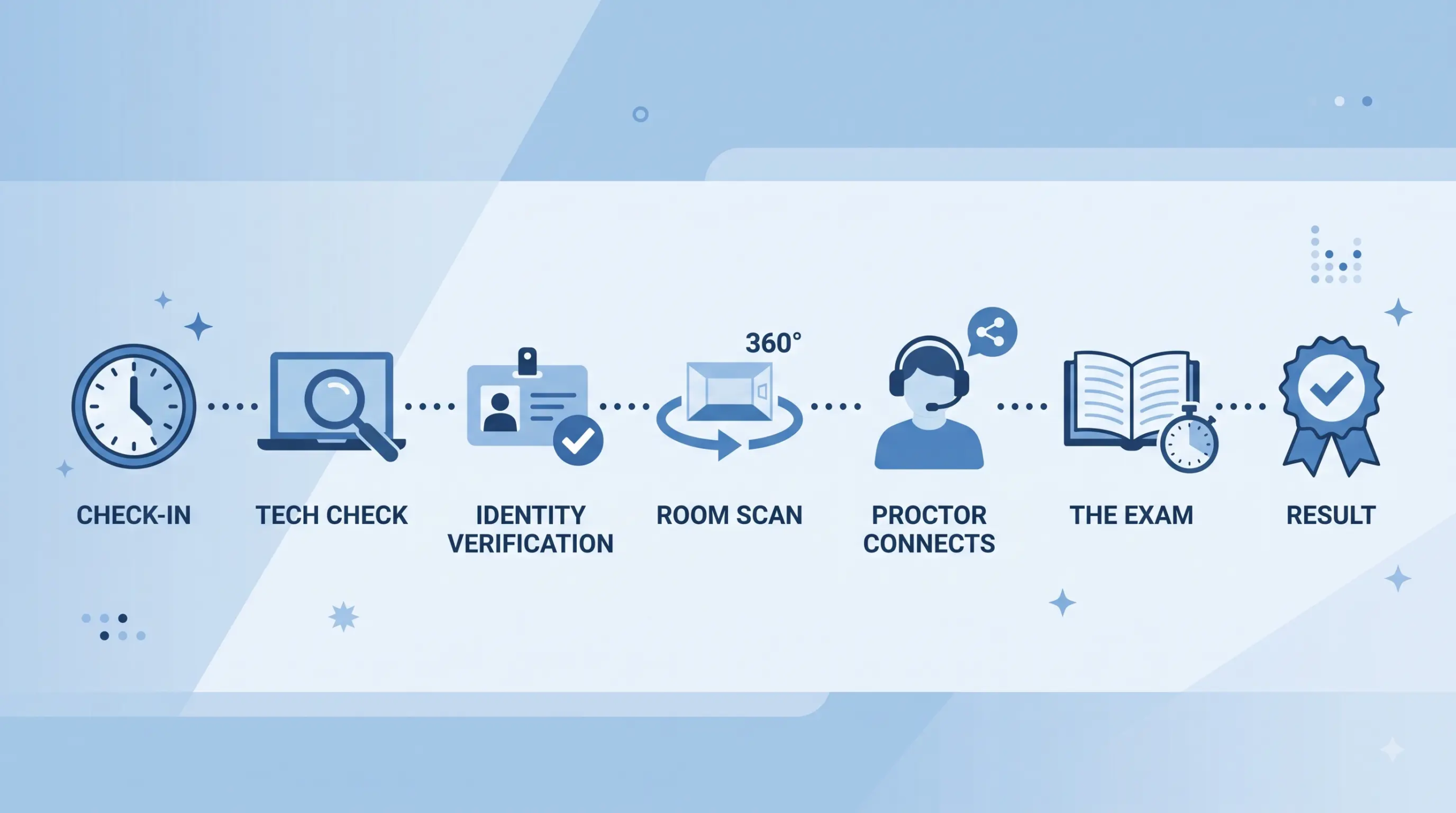
- 1. Check-in opens 30 minutes early. Log in to your PMI account and launch OnVUE through your scheduled appointment link.
- 2. Technology check. The system verifies your equipment meets requirements before proceeding.
- 3. Identity verification. You’ll take a headshot photo plus front-and-back photos of a government-issued ID.
- 4. Room scan. A 360° scan of your testing space, including your desk and walls.
- 5. Proctor connects. You may briefly queue for the next available proctor before the exam begins.
- 6. The exam. 240 minutes, monitored live via webcam and microphone with AI assistance. Your session is recorded for security and quality purposes.
- 7. Result. As with center-based testing, you’ll typically see a pass/fail indication on screen shortly after finishing.
What Gets an Exam Terminated
The proctor’s determination during the exam is final, and violations result in the exam being revoked with the fee forfeited. The most common avoidable mistakes:
- Leaving the webcam’s view, even briefly, when not on an approved break (not all exam types offer breaks)
- A second person entering the room
- Using a phone, smartwatch, or any device outside the approved setup
- Talking or reading questions aloud
- Having notes, papers, or a second monitor within reach
If your computer freezes or disconnects, close and relaunch rather than waiting indefinitely — the exam pauses on Pearson’s servers when a drop is detected. If the session ends due to a clear platform issue rather than something on your end, contact PMI support immediately to document it; PMI may reschedule at no cost in that case.
OnVUE vs. Test Center: Which Should You Choose?
Both options carry identical exam content, difficulty, and certification value. The difference is entirely about risk and control over your environment.
- Choose OnVUE if: you have a hardwired ethernet connection, a private room with a closed door, a clean desk, and confidence in your hardware.
- Choose a test center if: you have small children or others at home during the day, an unreliable internet connection, shared or open living space, or simply prefer having a proctor and equipment PMI already controls for.
A test center removes several failure modes entirely — no room scan risk, no home network drop, no walls to clear. OnVUE removes travel time and lets you pick a slot that fits your schedule, since appointments run 24/7.
Restricted Locations
OnVUE delivery is currently restricted for candidates using IDs from Belarus, Cuba, Iran, North Korea, Russia, Syria, and restricted regions of Ukraine. If you’re testing from or hold an ID from one of these locations, plan for a test center instead.
If you’re earlier in the process and still confirming eligibility, education hours, or the application itself before you even get to scheduling an exam mode, our Achieving PMP Certification guide walks through the full checklist.
Your first project is calling—will you answer? Join the ShriLearning Community Connect with fellow PMP aspirants and expert instructors. Crete your study plan for free from ShriLearning study-plan-generator.
FAQs
More for you

How to Use AI in Project Management: 10 Practical Workflows
saketpratapsinghdm2026-10-24T15:48:41+05:30October 24th, 2026|
Benefits of Agile Project Management for Small and Medium-Sized Businesses
saketpratapsinghdm2026-09-28T10:12:30+05:30September 28th, 2026|

Work Breakdown Structure (WBS): The Complete PMP Guide, With a Worked Example
saketpratapsinghdm2026-09-21T16:48:15+05:30September 21st, 2026|
Stakeholder Management and RACI: The Complete PMP Guide (With a Worked Example)
saketpratapsinghdm2026-09-21T15:07:42+05:30September 21st, 2026|
How to Write a Problem Statement (With a PMP-Ready Template and Examples)
saketpratapsinghdm2026-09-21T14:42:27+05:30September 21st, 2026|

Earned Value Management: How to Actually Read CPI and SPI (Not Just Calculate Them)
saketpratapsinghdm2026-09-17T15:32:44+05:30September 17th, 2026|

Agile Practice Guide – Second Edition: What Changed, and What It Means for Your PMI-ACP Prep
saketpratapsinghdm2026-09-17T14:45:53+05:30September 17th, 2026|

Why the PMP People Domain Dropped to 33% (And How to Master It in 2026)
saketpratapsinghdm2026-08-27T21:18:31+05:30August 27th, 2026|